
Every click, tracked for you.
Buttons, links, phone numbers and forms are counted automatically. No tags, no developer, no spreadsheet of event names.
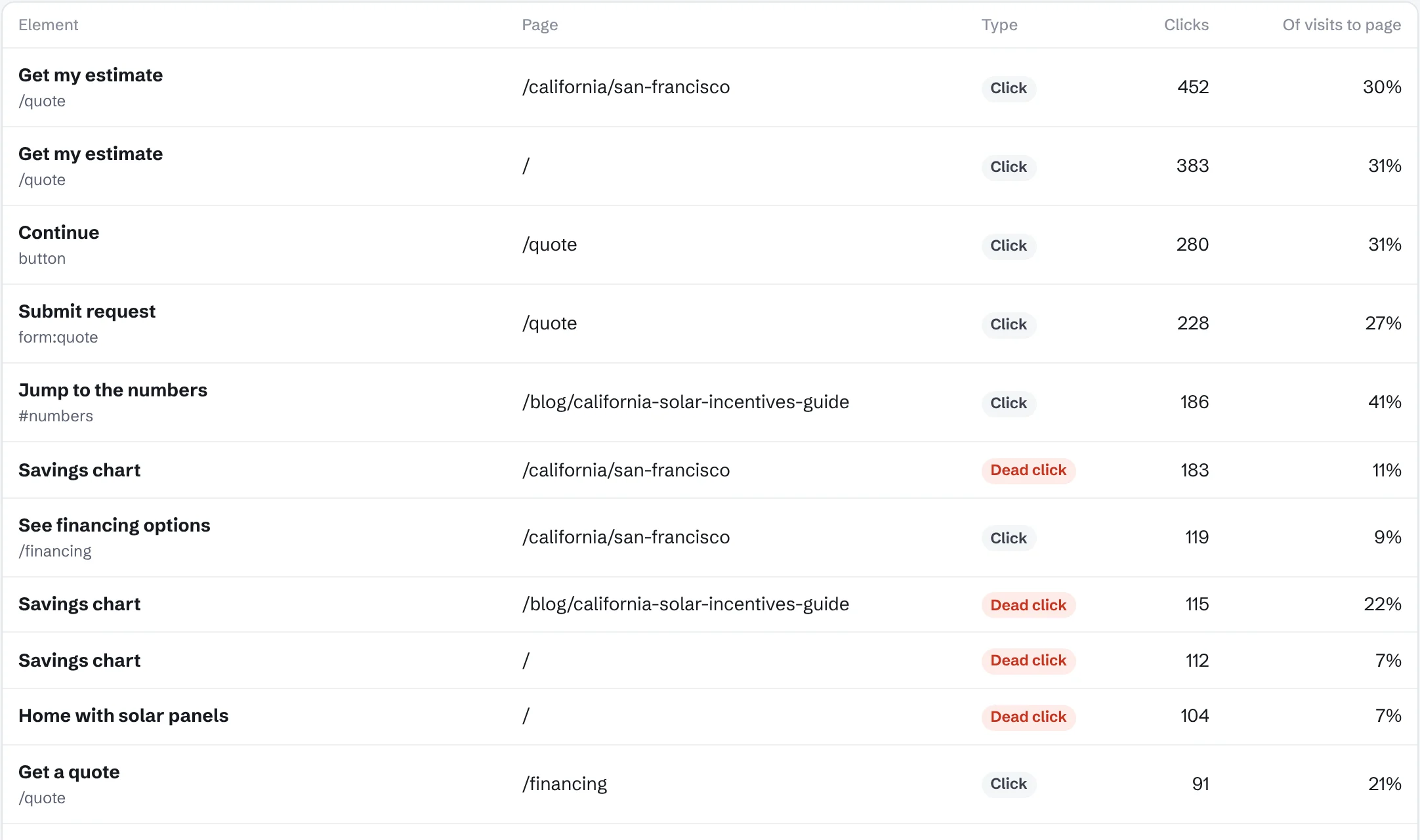
What you get
Named the way you’d name them
Clicks show up as the text on the button, like “Get my estimate”, not as CSS selectors.
Phone and email links
Taps on your phone number and email address are counted, so you can see calls your site started.
Dead clicks
Clicks on images, headings or charts that don’t do anything. Usually the easiest fix on the site.
Rage clicks
Several fast clicks in the same spot. A sign something is broken or slow.
Forms
Form submissions are counted automatically, by form name.
Turn any click into a goal
Pick a button from the list and count it as a conversion in one step.
Questions
Do I need to add code to each button?
No. Install the one-line snippet and every click is tracked. You can add a data-pv-event attribute if you want to rename something.
Does it work with single-page apps?
Yes. Page changes in React, Vue, Next.js and similar sites are tracked without extra setup.
What’s the difference between a dead click and a rage click?
A dead click is one click on something that doesn’t respond. A rage click is several fast clicks in the same spot, usually from frustration.